Press. Talk. Release.
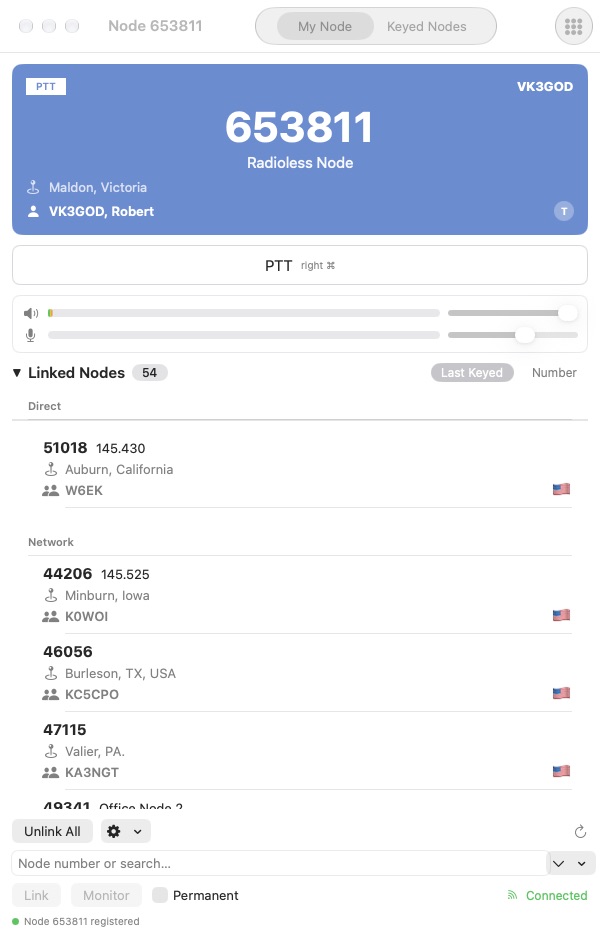
Use the on-screen PTT control or hold the right Command key while MacNode is focused. Adjust receive volume and microphone gain from the main window.
 MacNodeFOR macOSGet MacNode
 Bring your AllStarLink station to the desktop. Connect, listen and push to talk in a focused app that feels right at home on your Mac.
Built for macOS · For licensed amateur radio operators only
01 / AT THE CONTROLS
From finding a node to joining a QSO, keep your station’s essential controls within reach.
Use the on-screen PTT control or hold the right Command key while MacNode is focused. Adjust receive volume and microphone gain from the main window.
Search the node directory by number, callsign or location. See callsigns, descriptions and country flags, then link or monitor from the same window.
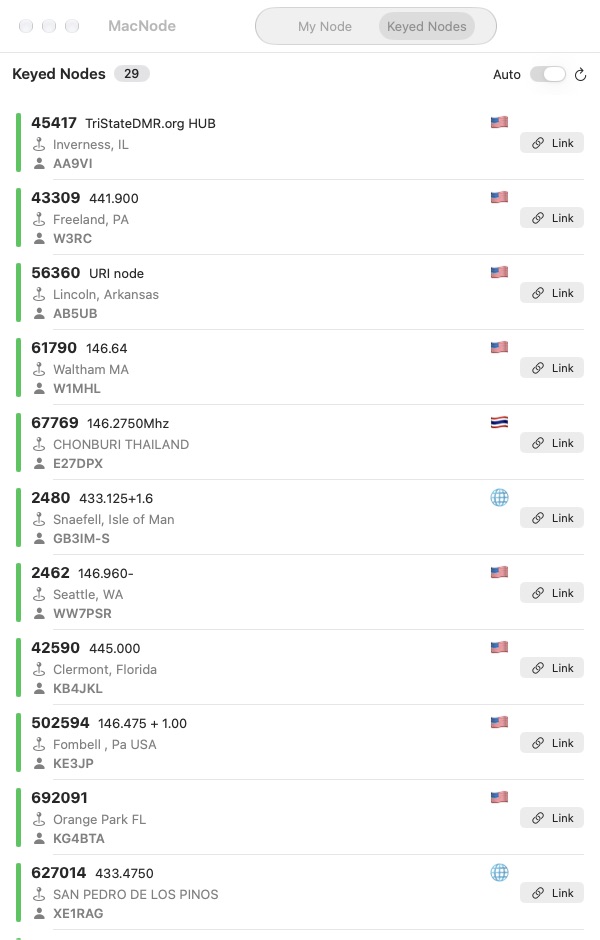
See direct and network-linked nodes, sort by last keyed or number, and browse the Keyed Nodes view with automatic refresh to see recent activity.
Link, monitor and unlink nodes, with permanent link and monitor options. Use the DTMF keypad and customize command codes for your node’s configuration.
Select an audio input from the macOS Audio menu. Keep your preferred microphone at hand, with input gain and level indicators in the app.
Register with your AllStarLink radioless node number and IAX password. Set your callsign, display name and location so your station feels like yours.
SEE MACNODE IN ACTION
The Keyed Nodes view brings network activity into focus. Browse stations, see their callsigns and locations, and link directly from the list.
Actual screenshot from the running MacNode app.
Station activity changes over time.
02 / ON THE WIRE
MacNode negotiates voice over IAX2 with five implemented codec formats. The remote node selects from the supported formats it allows.
Codec availability depends on the connected node’s configuration.
ulawalawadpcmg726aal2g72603 / GET ON THE NETWORK
MacNode is for licensed amateur radio operators only. You’ll need your AllStarLink account and a radioless node.
Sign in, then enter your radioless node number and IAX password in Settings. Add your callsign and station details.
Choose your microphone, search for a node and connect. Listen first, then use PTT when you’re ready to join in.
DOWNLOAD / COMING SOONMacNode for Mac. Your AllStarLink station,
with a place on your desktop.
The MacNode build will be added here.
For licensed amateur radio operators only. You must hold a valid amateur radio licence and use MacNode in accordance with the rules that apply to your station.